I’ve mentioned podcasting before, haven’t I? You see, I enjoy podcasting. And I enjoy podcasts. Some I listen to for entertainment. Some I listen to in the hope they’ll improve my own podcasting by offering tips and techniques I can borrow.
Some – like the ExtraShot podcast for video professionals – are very listenable even when you only have a very basic understanding of the subject. It offers an impressive combination of personalities and production values that kept me listening even when I had no idea what the two presenters were talking about.
And some demonstrate rather spectacularly how things shouldn’t be done.
I won’t name-and-shame the company whose podcast I’ve just heard, so let’s just say they have hundreds of employees and millions of customers. They provide a product and service that’s all about helping you store, organise and present information.
Now let’s jump straight into their latest podcast:
[theme tune, followed by brief introductions of the three presenters]
Voice 1: Those that are paying attention may notice that the last podcast was number 40.
Voice 2: No-one’s paying attention.
Voice 1: No-one’s paying attention. Someone’s paying attention. Who’s that one person, mom?
Voice 2: Not my mom. My mom gave up. She stopped listening to this. It’s true.
Voice 1: Erm. We’re now at 42 because we did record a 41…
Voice 2: …but it was lost forever.
Voice 1: It’s just on my computer…
Voice 2: Oh, it’s not lost.
Voice 1: …and all I need to do is listen to it.
Voice 3: So you will release these out of order on purpose?
Voice 1: I think that is about to happen. Although who knows when this will get released. So…
Voice 2: When did we record 41? It was like a year…
Voice 1: Six months ago.
Voice 2: Six months ago.
Voice 3: Do you have to explain the cliff-hanger then, like…?
Voice 1: You know what’s funny, though? Number 40 – because we haven’t done this in a year – number 40 was about the previous conference.
Voice 2: No way.
Voice 1: And there was a cliff-hanger at the end where we said “We just have too much stuff. We’re gonna do part 2 in the next podcast.” Then when we recorded the next podcast we didn’t.
Voice 2: We forgot.
Voice 1: Because we forgot. [Laughter] And now we’re gonna talk about this year’s conference.
I didn’t make it beyond the first couple of minutes, so the company’s 2014 conference (which took place two months earlier) remains a mystery.
Look, I understand that podcasts need personality. Yes, some of this is ‘banter’ – so let’s not take it too seriously – but it’s also being broadcast in the company’s name on the company’s web site, so I’m not going to dismiss it completely.
Ultimately, I’m left in no doubt that this particular company doesn’t have much commitment to its podcasts. And that doesn’t reflect well on its products, either.
Showing posts with label podcast. Show all posts
Showing posts with label podcast. Show all posts
Wednesday, 24 December 2014

Friday, 24 October 2014
Philips Voice Tracer DVT6000 review
Mark Bridge writes:
If I'm interviewing someone for a podcast, I'll generally use my Zoom H4N recorder and a separate microphone or two. But I don't need the same level of high-quality kit if I'm interviewing someone for a written interview.
Of course, the H4N will do a perfectly good job with its built-in microphones. But why carry an expensive recording device when your mobile phone can do the same job? That's tended to be my perspective.
I've had the HiFiCorder Android app for a couple of years. It's a straightforward recording application that can produce a digital file for playback on my phone or PC. At least, it was, until the battery on my smartphone started to show its age. Recording an interview might mean no more phone calls for the rest of the day. Which left me wondering whether a separate digital recorder might actually be better.
With nigh-on perfect timing, I'm contacted by Philips. Would I like to review one of their new Voice Tracers?
A few days later, the Philips Voice Tracer DVT6000 arrives. It's described as the model 'for lectures and interviews', thanks in part to a three-microphone system that combines a directional central mic with omni-directional microphones on each side. Promisingly, it claims to offer up to 50 hours of battery life. I've not had that from a mobile phone since I upgraded from my Nokia 2110.
Incidentally, on the subject of historic technology, Philips founded its Speech Processing business sixty years ago and created its first digital recorder back in 1996. But I digress.
Inside the box is the DVT6000 recorder, a USB-to-microUSB lead and a pair of earphones. There's also a guarantee booklet and a quick-start guide with diagrams. The DVT6000 charges via the USB lead, so I plug it into my laptop for a couple of hours and we're good to go.
Switch on and the colour display screen springs into life. Recording and playback is very straightforward, as you'd expect from a dedicated device. You can even switch on and start recording straight away by pressing the 'record' button rather than using the lockable on/off slider on the side. Other notable physical features include a flip-out desktop stand on the underneath, sockets for headphones and external microphone, a microSD memory slot for extra storage and a 'delete' button. That's a welcome alternative to delving into a menu system when you need to remove unwanted recordings. In a remarkably simple yet clever move, the company has stored a pdf copy of the full user manual on the device; you can view it on a PC by connecting the DVT6000 via that USB cable.
Hit the record button and the device displays 'analysing distance' for a second or two. Thanks to a motion sensor and those three microphones, the DVT6000 can automatically work out how best to record your chosen sound source. A lecture may require the tutor's voice to be recorded from several metres away, so it'll focus on the central mic and ignore ambient noise from the sides, while a conventional face-to-face interview will use all three microphones. When recording starts, there's a display of recording levels, an elapsed time counter and a smaller counter to remind you how much memory space remains.
The 'AutoZoom' feature for conversation/distance recording can be switched on or off depending on your preference. Other options include the ability to filter out wind noise - useful if you're making a recording outside - and cutting down constant background noise. Both can be useful if there's nowhere quiet to chat. It's possible to start recording via a built-in timer or whenever someone starts speaking... and you can activate a pre-recording mode to ensure you never miss the beginning of a sentence.
When it's time for playback, you can transfer the audio files to your PC - but there's generally no need to do this. A built-in loudspeaker (or those supplied earphones) lets you listen to your recordings. A 'ClearVoice' function can boost quiet voices to make it easier for you to understand what they were saying. And if you do want to listen via PC, the files are recorded in mp3 format and are named with the date/time of recording, so it's easy to find the one you're looking for.
If you're serious about dictation and indexing, the DVT6000 has a few more tricks up its sleeve. Playback can be slowed down or sped up, while parts of a recording can be 'marked' with easy-to-find indicators.
It's even possible to use the device as an FM radio or a music player, with an extra option of recording from the radio if you want.
Finally, to the all-important question of recording quality. Well, the Philips Voice Tracer was significantly better than using my smartphone. I'll admit to being slightly surprised by this; I'd expected them to be evenly matched. However, the DVT6000 reproduced my interview more accurately while the phone recordings sounded more 'tinny' with noticeably less bass. And on one test, a brief hiccup in the smartphone recording - probably due to an app updating in the background - meant I lost a couple of words. Would the results from the Philips DVT6000 be good enough for a podcast interview? Under the right circumstances and in high-quality recording mode, yes.
Of course, the best audio recorder - much like the best camera - is always the one you have with you. But based on my experience, I'll be keeping the Philips DVT6000 and packing it whenever I have an interview lined up. I know I can always use my smartphone in an emergency. But I've been impressed at how well the Philips recorder does its job... and how much better it does its job than the jack-of-all-trades I usually rely on.
This article was first published on TheFonecast.com, October 2014.
If I'm interviewing someone for a podcast, I'll generally use my Zoom H4N recorder and a separate microphone or two. But I don't need the same level of high-quality kit if I'm interviewing someone for a written interview.
Of course, the H4N will do a perfectly good job with its built-in microphones. But why carry an expensive recording device when your mobile phone can do the same job? That's tended to be my perspective.
I've had the HiFiCorder Android app for a couple of years. It's a straightforward recording application that can produce a digital file for playback on my phone or PC. At least, it was, until the battery on my smartphone started to show its age. Recording an interview might mean no more phone calls for the rest of the day. Which left me wondering whether a separate digital recorder might actually be better.
With nigh-on perfect timing, I'm contacted by Philips. Would I like to review one of their new Voice Tracers?
A few days later, the Philips Voice Tracer DVT6000 arrives. It's described as the model 'for lectures and interviews', thanks in part to a three-microphone system that combines a directional central mic with omni-directional microphones on each side. Promisingly, it claims to offer up to 50 hours of battery life. I've not had that from a mobile phone since I upgraded from my Nokia 2110.
Incidentally, on the subject of historic technology, Philips founded its Speech Processing business sixty years ago and created its first digital recorder back in 1996. But I digress.
Inside the box is the DVT6000 recorder, a USB-to-microUSB lead and a pair of earphones. There's also a guarantee booklet and a quick-start guide with diagrams. The DVT6000 charges via the USB lead, so I plug it into my laptop for a couple of hours and we're good to go.
Switch on and the colour display screen springs into life. Recording and playback is very straightforward, as you'd expect from a dedicated device. You can even switch on and start recording straight away by pressing the 'record' button rather than using the lockable on/off slider on the side. Other notable physical features include a flip-out desktop stand on the underneath, sockets for headphones and external microphone, a microSD memory slot for extra storage and a 'delete' button. That's a welcome alternative to delving into a menu system when you need to remove unwanted recordings. In a remarkably simple yet clever move, the company has stored a pdf copy of the full user manual on the device; you can view it on a PC by connecting the DVT6000 via that USB cable.
Hit the record button and the device displays 'analysing distance' for a second or two. Thanks to a motion sensor and those three microphones, the DVT6000 can automatically work out how best to record your chosen sound source. A lecture may require the tutor's voice to be recorded from several metres away, so it'll focus on the central mic and ignore ambient noise from the sides, while a conventional face-to-face interview will use all three microphones. When recording starts, there's a display of recording levels, an elapsed time counter and a smaller counter to remind you how much memory space remains.
The 'AutoZoom' feature for conversation/distance recording can be switched on or off depending on your preference. Other options include the ability to filter out wind noise - useful if you're making a recording outside - and cutting down constant background noise. Both can be useful if there's nowhere quiet to chat. It's possible to start recording via a built-in timer or whenever someone starts speaking... and you can activate a pre-recording mode to ensure you never miss the beginning of a sentence.
When it's time for playback, you can transfer the audio files to your PC - but there's generally no need to do this. A built-in loudspeaker (or those supplied earphones) lets you listen to your recordings. A 'ClearVoice' function can boost quiet voices to make it easier for you to understand what they were saying. And if you do want to listen via PC, the files are recorded in mp3 format and are named with the date/time of recording, so it's easy to find the one you're looking for.
If you're serious about dictation and indexing, the DVT6000 has a few more tricks up its sleeve. Playback can be slowed down or sped up, while parts of a recording can be 'marked' with easy-to-find indicators.
It's even possible to use the device as an FM radio or a music player, with an extra option of recording from the radio if you want.
Finally, to the all-important question of recording quality. Well, the Philips Voice Tracer was significantly better than using my smartphone. I'll admit to being slightly surprised by this; I'd expected them to be evenly matched. However, the DVT6000 reproduced my interview more accurately while the phone recordings sounded more 'tinny' with noticeably less bass. And on one test, a brief hiccup in the smartphone recording - probably due to an app updating in the background - meant I lost a couple of words. Would the results from the Philips DVT6000 be good enough for a podcast interview? Under the right circumstances and in high-quality recording mode, yes.
Of course, the best audio recorder - much like the best camera - is always the one you have with you. But based on my experience, I'll be keeping the Philips DVT6000 and packing it whenever I have an interview lined up. I know I can always use my smartphone in an emergency. But I've been impressed at how well the Philips recorder does its job... and how much better it does its job than the jack-of-all-trades I usually rely on.
This article was first published on TheFonecast.com, October 2014.
Monday, 20 May 2013
Why I like audio recording
I like audio recording. This probably won't surprise you. It's something I spend a fair amount of time doing.
I'm particularly fond of on-location interviews that have enough background sounds to give you a sense of where you are without being distracting. If you hear the sounds of the seaside you'll get a different impression than if you heard the sounds of an exhibition hall.
But what I've not done until recently is give much thought to exactly why I like the recording and editing process.
I was editing an interview that I'd recorded with the CEO of a technology company in a hotel restaurant. As far as I can tell, PR people tend to treat hotel restaurants in the same way that the rest of us use offices. WiFi, coffee, other people ignoring you...
Anyway, I was listening back to the interview - fortunately no piano player, no china being dropped, just a little indistinguishable background chatter - and I started cutting out a few of the 'ums' and 'ers' that punctuated the conversation. Quite a few, actually. The end result was rather pleasing, even if I say so myself.
The conversation still flowed but it was tighter and - dare I say - more listenable than it was before.
Had I been doing the recording with magnetic tape, I'd now have a pile of off-cuts - each one an um, an er, a 'so' or - my particular favourite - 'that's a good question'. Over the course of several interviews I'd have accumulated enough for some kind of art project. Maybe a spoken version of Do Re Mi in assorted European accents.
Fortunately digital editing is less painful than its old-school equivalent. And I don't just mean mentally - I never was much good with a razor blade and a chinagraph pencil.
It was the editing process that got me thinking about why I enjoyed audio recording above its alternatives. If I'd been video recording, I wouldn't have been able to remove as many hesitations, phonic tics and repeated words. At least, not while remaining focussed on the interview subject. Yet if I'd been editing a written interview, I could have included all manner of incidental subjects and could even have rearranged the timeline. The audio interview seems - if you'll forgive the cliche and its associated pun - a happy medium. It's a slice of time, a snapshot, an experience. It's been polished a little, it's been put in a frame but it maintains its authenticity.
To put things simply, you know where you are.
[Recorded using the HiFiCorder Android app on a Google Nexus S mobile phone; audio version available on ipadio.com]
I'm particularly fond of on-location interviews that have enough background sounds to give you a sense of where you are without being distracting. If you hear the sounds of the seaside you'll get a different impression than if you heard the sounds of an exhibition hall.
But what I've not done until recently is give much thought to exactly why I like the recording and editing process.
I was editing an interview that I'd recorded with the CEO of a technology company in a hotel restaurant. As far as I can tell, PR people tend to treat hotel restaurants in the same way that the rest of us use offices. WiFi, coffee, other people ignoring you...
Anyway, I was listening back to the interview - fortunately no piano player, no china being dropped, just a little indistinguishable background chatter - and I started cutting out a few of the 'ums' and 'ers' that punctuated the conversation. Quite a few, actually. The end result was rather pleasing, even if I say so myself.
The conversation still flowed but it was tighter and - dare I say - more listenable than it was before.
Had I been doing the recording with magnetic tape, I'd now have a pile of off-cuts - each one an um, an er, a 'so' or - my particular favourite - 'that's a good question'. Over the course of several interviews I'd have accumulated enough for some kind of art project. Maybe a spoken version of Do Re Mi in assorted European accents.
Fortunately digital editing is less painful than its old-school equivalent. And I don't just mean mentally - I never was much good with a razor blade and a chinagraph pencil.
It was the editing process that got me thinking about why I enjoyed audio recording above its alternatives. If I'd been video recording, I wouldn't have been able to remove as many hesitations, phonic tics and repeated words. At least, not while remaining focussed on the interview subject. Yet if I'd been editing a written interview, I could have included all manner of incidental subjects and could even have rearranged the timeline. The audio interview seems - if you'll forgive the cliche and its associated pun - a happy medium. It's a slice of time, a snapshot, an experience. It's been polished a little, it's been put in a frame but it maintains its authenticity.
To put things simply, you know where you are.
[Recorded using the HiFiCorder Android app on a Google Nexus S mobile phone; audio version available on ipadio.com]
Monday, 26 September 2011
Working with words
Time for a brief mention about work for those who wonder what I do when I'm not writing. As well as being a copywriter, I’m also a podcaster for The Fonecast. We produce weekly broadcasts of UK mobile industry news for everyone from dealers to developers, covering all the top stories from within the mobile phone business. You’ll find our podcasts on iTunes, from our RSS feed and on the home page of our website.
Monday, 5 April 2010
A very mobile wedding
Well, as I mentioned on 3rd April, I got married. Well done me. And, as I also mentioned, I was attempting to use a variety of different online social-type services from my mobile phone. So... how did it go?
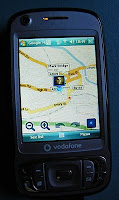 I updated my location on Foursquare, which was a little bit messy on Windows Mobile because you’ve got to tell it where you are. (Unlike the iPhone app, for example, which can automatically use GPS to narrow things down). I also used Google Latitude to keep a small circle of friends up-to-date with where I was. (If I'd wanted to share a one-off location update, I'd have chosen Glympse instead).
I started the day by sending a text message update to Twitter. (It wasn't quite the 'Twitter wedding' that some people have achieved - but I didn't want to be too distracted during the important bits).
Then, when I picked up the flowers, I sent a MMS picture message to photo-sharing site Flickr. This wasn't perfect - I didn't use all of Flickr's mobile options so I needed to 'tweak' the file name and description later. I also updated this blog by visiting Blogger.com from my phone's browser. (I'd wanted to use ShoZu to upload a photo to Blogger at the same time but I’d written the blog post in a separate document and couldn’t cut and paste it into ShoZu).
Later that day I uploaded a photo and a short note using the Facebook application on my phone. (It’s an HTC phone running Windows Mobile). In fact, all of the day’s updates showed up on Facebook, thanks to FriendFeed, which takes information from other social networking sites and adds them to Facebook as well.
 I updated my location on Foursquare, which was a little bit messy on Windows Mobile because you’ve got to tell it where you are. (Unlike the iPhone app, for example, which can automatically use GPS to narrow things down). I also used Google Latitude to keep a small circle of friends up-to-date with where I was. (If I'd wanted to share a one-off location update, I'd have chosen Glympse instead).
I left a short phone blog - a phlog - using ipadio. Not only does ipadio put your voice blog online, it also uses SpinVox to convert your words to text. It's all as simple as making a phone call. And I recorded a short video clip using Qik. Rather like a video version of ipadio, Qik doesn’t just record but also streams live, which means people could watch or listen online in real time.
Reasonably pleasing, I'd say. Anyway, I'll be talking more about my technology - and the services I used - in this week's edition of The Fonecast on Wednesday.
Tuesday, 29 December 2009
Don't look back, look inside!
My, what a year it’s been. I’m currently sandwiched between Christmas 2009 and the 2010 New Year – and taking a break from my sprout and cranberry bubble-and-squeak to write a few notes for The Fonecast’s first podcast of 2010. Next week we’ll be looking back at 2009, turning our backs on Swine Flu and President Obama’s election in favour of the iPhone 3GS, Avenir Telecom and Digital Britain.
As part of my research I’ve browsed through Google Zeitgeist – its spirit of 2009 summary – for a little inspiration. And you know what? The UK mobile industry doesn’t play much of a part in it. Oh, sure, there’s a lot of online stuff and that inevitable bleed-through into the mobile internet… but we’re not really all that big. Lady Gaga, cheap flights, Facebook; they matter to the people of the UK. Mobile phones? Not important.
And for a moment I was taken back to my school days and a lesson from our Religious Studies teacher. One day he talked on the subject of “No-one believes in their own immortality”. He said we could easily imagine a world without other people – but not without ourselves. I remember it as being a very effective lesson. At this point we’d not read Freud’s thoughts on the subject. I still haven’t.
Anyway, it brought me back to a topic that I’ve touched on a couple of times this year. We in the mobile phone business really shouldn’t be so full of ourselves (if, of course, we are). Things that we think of as enormously big deals don’t carry the same weight for other people. No-one outside our little bubble world cares about the merger of Orange and T-Mobile. Not really.
Which means we 'mobile people' probably need to spend more time in 2010 explaining why these things are important. And perhaps, just perhaps, we need to get a little perspective, too!
As part of my research I’ve browsed through Google Zeitgeist – its spirit of 2009 summary – for a little inspiration. And you know what? The UK mobile industry doesn’t play much of a part in it. Oh, sure, there’s a lot of online stuff and that inevitable bleed-through into the mobile internet… but we’re not really all that big. Lady Gaga, cheap flights, Facebook; they matter to the people of the UK. Mobile phones? Not important.
And for a moment I was taken back to my school days and a lesson from our Religious Studies teacher. One day he talked on the subject of “No-one believes in their own immortality”. He said we could easily imagine a world without other people – but not without ourselves. I remember it as being a very effective lesson. At this point we’d not read Freud’s thoughts on the subject. I still haven’t.
Anyway, it brought me back to a topic that I’ve touched on a couple of times this year. We in the mobile phone business really shouldn’t be so full of ourselves (if, of course, we are). Things that we think of as enormously big deals don’t carry the same weight for other people. No-one outside our little bubble world cares about the merger of Orange and T-Mobile. Not really.
Which means we 'mobile people' probably need to spend more time in 2010 explaining why these things are important. And perhaps, just perhaps, we need to get a little perspective, too!
Wednesday, 9 September 2009
Sounds like Paris
An assortment of sound effects from a trip to Paris in August 2009. They include:
- The Ashford Eurostar terminal
- Eurostar train arriving
- Onboard the train
- Paris Eurostar terminal
- Paris Metro
- Street noise
- TV weather forecast
- More street noise
- Café
- Park
- Street musicians
- Street noise
- Another two groups of street musicians
- Inside the Pompidou Centre
- Protest march
- Cafe outdoors
- Walking through Jardin du Luxembourg
- Frog & Princess pub / football on TV
- Sacre Coeur interior
- Metro interior (including busker with accordian)
- Eurostar - pre departure announcement
- Onboard Eurostar message
Thursday, 30 April 2009
Carbon footsteps to Brighton
It's around 10 o’clock on a rainy weekday morning and I'm driving into Brighton. I've always been a fan of public transport, although living in London taught me it's sometimes neither cheaper nor quicker. Today I thought I'd compare the costs - not just financially but also the environmental impact and the time I'm spending.
Fortunately there's a Brighton & Hove Council car park opposite my destination. That's £2.20 for two hours, which is pretty competitive for somewhere as busy as Brighton. I could have parked further away for less but time is of the essence today.
My journey took 33 minutes to cover 12.3 miles. Now, let’s assume my car does 28 miles to the gallon. Okay, it’s not an assumption. I’ve been keeping track of my average fuel consumption for the last couple of years. That’s just under a gallon of petrol for the round trip. Petrol’s 94.9p a litre at the moment, or £4.31 a gallon if you prefer, so – putting my trusty solar-powered calculator to work – that’s £3.79 on petrol, plus £2.20 on parking, which is a penny short of £6.
If I head over to vcacarfueldata.org.uk, I learn that my car emits 248g of carbon per kilometre. That’s pretty high compared with smaller, newer cars. So, swapping between imperial and metric again, my 24.6 mile round-trip left 9.8kg of CO2 floating around. I don’t know exactly what that means but another quick internet search suggests it’ll take a single tree a whole year to absorb that, so it doesn’t sound too good at this stage.
£5.99 for the round trip, 9.8kg of CO2 footprint and 33 minutes each way. It’s time to take a look at a bus trip.
 Journey time on a bus is going to be longer. To start with there’s the five minute walk to the bus stop, plus the extra five minutes to make sure I don’t miss the bus if it’s a bit early. Then there’s what should be around 42 minutes on the bus and another three or four minutes walk at the other end. Let’s say 55 minutes in total if I’m lucky.
My return ticket costs £3.50. Nothing more to pay. The driving’s slightly shorter than the car trip because the bus stops on the main road. So we’re looking at 11.1 miles each way; a 22.2 mile round trip. I can’t calculate a precise personal carbon cost because it’ll vary depending on the number of people on the bus. Apparently a bus produces five times more CO2 than my car – but it also carries more people than my car. Looking at carbonindependent.org, they say figures from the Department for Environment, Food and Rural Affairs suggest an average 89g per km per person, so I’ll use that – which gives me a figure of 3.2kg of CO2. I could also factor in my personal CO2 emissions from breathing more heavily when walking uphill, wear and tear on my shoes, wear and tear on my car – but I’m just after a rough figure to compare a trip to Brighton and back.
So – driving from Lewes to Brighton takes 40% less time than catching the bus but the bus costs 40% less and only produces a third of the Carbon Dioxide. What does that mean? Nothing that I didn’t know or couldn’t guess. If there’s time for me to choose between taking the bus and driving myself, I’ll take the bus. And I’ll be looking more closely at carbon emissions when it’s time to change my car.
Fortunately there's a Brighton & Hove Council car park opposite my destination. That's £2.20 for two hours, which is pretty competitive for somewhere as busy as Brighton. I could have parked further away for less but time is of the essence today.
My journey took 33 minutes to cover 12.3 miles. Now, let’s assume my car does 28 miles to the gallon. Okay, it’s not an assumption. I’ve been keeping track of my average fuel consumption for the last couple of years. That’s just under a gallon of petrol for the round trip. Petrol’s 94.9p a litre at the moment, or £4.31 a gallon if you prefer, so – putting my trusty solar-powered calculator to work – that’s £3.79 on petrol, plus £2.20 on parking, which is a penny short of £6.
If I head over to vcacarfueldata.org.uk, I learn that my car emits 248g of carbon per kilometre. That’s pretty high compared with smaller, newer cars. So, swapping between imperial and metric again, my 24.6 mile round-trip left 9.8kg of CO2 floating around. I don’t know exactly what that means but another quick internet search suggests it’ll take a single tree a whole year to absorb that, so it doesn’t sound too good at this stage.
£5.99 for the round trip, 9.8kg of CO2 footprint and 33 minutes each way. It’s time to take a look at a bus trip.
 Journey time on a bus is going to be longer. To start with there’s the five minute walk to the bus stop, plus the extra five minutes to make sure I don’t miss the bus if it’s a bit early. Then there’s what should be around 42 minutes on the bus and another three or four minutes walk at the other end. Let’s say 55 minutes in total if I’m lucky.
My return ticket costs £3.50. Nothing more to pay. The driving’s slightly
 shorter than the car trip because the bus stops on the main road. So we’re looking at 11.1 miles each way; a 22.2 mile round trip. I can’t calculate a precise personal carbon cost because it’ll vary depending on the number of people on the bus. Apparently a bus produces five times more CO2 than my car – but it also carries more people than my car. Looking at carbonindependent.org, they say figures from the Department for Environment, Food and Rural Affairs suggest an average 89g per km per person, so I’ll use that – which gives me a figure of 3.2kg of CO2. I could also factor in my personal CO2 emissions from breathing more heavily when walking uphill, wear and tear on my shoes, wear and tear on my car – but I’m just after a rough figure to compare a trip to Brighton and back.
So – driving from Lewes to Brighton takes 40% less time than catching the bus but the bus costs 40% less and only produces a third of the Carbon Dioxide. What does that mean? Nothing that I didn’t know or couldn’t guess. If there’s time for me to choose between taking the bus and driving myself, I’ll take the bus. And I’ll be looking more closely at carbon emissions when it’s time to change my car.
Thursday, 23 April 2009
Lewes: the Cuilfail Tunnel
A few months ago I moved to East Sussex and now live just outside the county town of Lewes. I was born and brought up over the border in West Sussex – and grew up with the slightly odd idea that West was best. Because I’m here in Lewes, I thought it was time to learn slightly more about the East; my new home. And I’m going to start by heading underground.
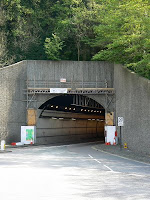 The Cuilfail Tunnel is the single reason that many people don’t visit Lewes, because it allows traffic on the busy A27 to bypass the town. It’s around 430 metres long, boring through a chalk hillside between the eastern edge of Lewes and the roundabout south of me at Southerham.
The tunnel was officially opened in December 1980, although it’s part of a traffic planning process that started before the Second World War and involved a couple of angry public inquiries in 1964 and 1972. The bypass itself was started in 1975, with work on the tunnel beginning a few years later.
Today, the tunnel is having more than £2 million of government money spent on renovating it. There’s new cladding and new lighting going inside, which will apparently help to reduce future maintenance costs. It may not be pretty but it’s a welcome alternat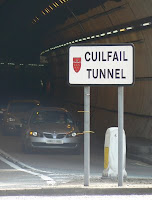 ive to the original plan from the 1970s, which would have seen all the houses demolished along one side of South Street.
The tunnel gets its name from the Cuilfail area of Lewes, although it’s not a local name. Just over a hundred years ago the land above the tunnel, which is now a golf course, was owned by a local solicitor who named it after a house he owned in Scotland. Apparently the Gaelic root means "Shelter” or “Retreat”.
And the tunnel’s not the only modern landmark in the area. At the Lewes end of the tunnel is a spiral sculpture of Portland Stone that suggests a giant ammonite fossil – the kind of thing you might find in the chalk that the tunnel cuts through. It was created by Peter Randall-Page and was placed here in 1983 to mark the tunnel’s opening. Locally it’s often called the snail – perhaps an appropriate metaphor for the state of local traffic if the tunnel wasn’t here.
 The Cuilfail Tunnel is the single reason that many people don’t visit Lewes, because it allows traffic on the busy A27 to bypass the town. It’s around 430 metres long, boring through a chalk hillside between the eastern edge of Lewes and the roundabout south of me at Southerham.
The tunnel was officially opened in December 1980, although it’s part of a traffic planning process that started before the Second World War and involved a couple of angry public inquiries in 1964 and 1972. The bypass itself was started in 1975, with work on the tunnel beginning a few years later.
Today, the tunnel is having more than £2 million of government money spent on renovating it. There’s new cladding and new lighting going inside, which will apparently help to reduce future maintenance costs. It may not be pretty but it’s a welcome alternat
 ive to the original plan from the 1970s, which would have seen all the houses demolished along one side of South Street.
The tunnel gets its name from the Cuilfail area of Lewes, although it’s not a local name. Just over a hundred years ago the land above the tunnel, which is now a golf course, was owned by a local solicitor who named it after a house he owned in Scotland. Apparently the Gaelic root means "Shelter” or “Retreat”.
And the tunnel’s not the only modern landmark in the area. At the Lewes end of the tunnel is a spiral sculpture of Portland Stone that suggests a giant ammonite fossil – the kind of thing you might find in the chalk that the tunnel cuts through. It was created by Peter Randall-Page and was placed here in 1983 to
 mark the tunnel’s opening. Locally it’s often called the snail – perhaps an appropriate metaphor for the state of local traffic if the tunnel wasn’t here.
Subscribe to:
Posts (Atom)